4K PoE Camera System with Local NVR Storage: 2026 Buying Guide
Choose the ideal 4K PoE camera system with local NVR storage. Learn to estimate drive capacity, plan cable runs, and position cameras for maximum security.
The sharpest 4K image won’t help if a camera misses the entrance or the NVR overwrites footage before you need it. Choosing a 4k poe camera system with local nvr storage means weighing more than resolution: camera placement, recording settings, bandwidth and drive capacity all affect how useful the system will be. Start with the views you need, how long you want footage available, and the practicalities of a wired installation.
This guide explains how 4K cameras, Power over Ethernet and an NVR work together, so you can compare systems against your property’s needs instead of choosing by headline specs. You’ll learn what affects storage and retention, how continuous and motion-based recording change capacity needs, and why NVR channel count matters if you plan to add cameras. We’ll also cover cable routing and camera coverage. Wide Way provides security camera and CCTV installation across the UAE, bringing system planning and professional installation together.
Key Takeaways
- Choose camera positions around the views you need to cover, not resolution alone.
- Estimate retention using camera count, recording schedule, frame rate and compression.
- When comparing a 4k poe camera system with local nvr storage, match NVR channels and drive capacity to your current plan and likely expansion.
- Plan cable routes and recorder placement, then compare each camera’s operating range and environmental rating with the installation conditions.
- Wide Way offers security cameras from Eufy, EZVIZ and Imou, along with CCTV and security camera installation across the UAE.
Table of Contents
- What a 4K PoE Camera System with Local NVR Storage Actually Includes
- How 4K Resolution, Recording Settings, and NVR Storage Work Together
- How to Compare 4K PoE NVR Systems for Your Property
- Installation and UAE Conditions: Plan a Reliable Wired Camera System
- Choose a Complete Security Camera Solution with Wide Way
What a 4K PoE Camera System with Local NVR Storage Actually Includes
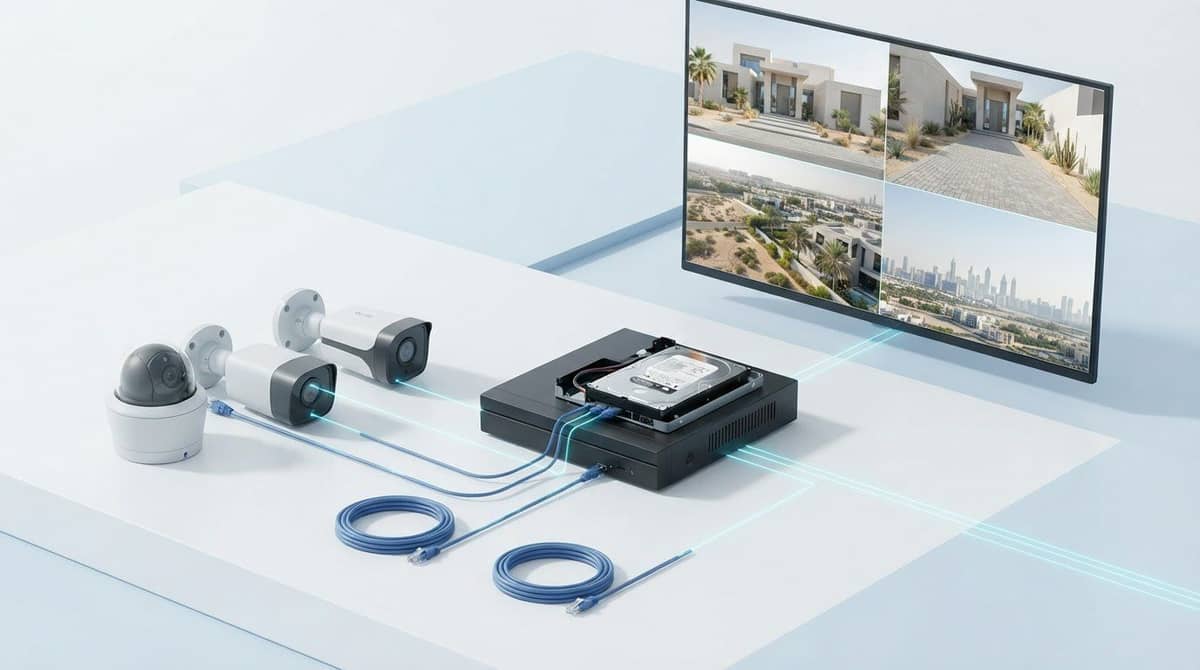
A 4K PoE camera system with local NVR storage combines network cameras, Ethernet cabling, a recorder and a storage drive. PoE means Power over Ethernet: compatible equipment can carry electrical power and data over the same cable. An NVR, or network video recorder, receives and records footage from IP cameras. With local storage, recordings are saved on-site, typically to a drive installed in or connected to the recorder. 4K describes image resolution, commonly 3840 × 2160 pixels. It does not guarantee identifiable detail in every scene. Distance, lighting, camera angle and lens choice all affect what the footage captures. For a concise overview, see understanding 4K resolution.
A complete setup brings several parts together:
- PoE cameras capture video at the planned locations.
- Ethernet cables carry network data and, with compatible devices, power to each camera.
- A PoE NVR or PoE switch connects the cameras to the recording system. A PoE NVR has powered camera ports built in. A separate PoE switch provides those ports when the NVR does not.
- A storage drive holds recordings for review. Its capacity and the recording configuration affect how long footage remains available.
The camera-to-recorder path is wired, but that does not automatically isolate the full system from a network. Depending on the setup, the NVR may connect to a router for network functions.
How PoE cameras connect to an NVR
With a PoE NVR, each camera’s Ethernet cable runs to a powered port on the recorder. With a separate PoE switch, the camera cables run to the switch, which connects to the NVR over the network. In either arrangement, compatible Ethernet links carry video data and camera power. Wired connections reduce reliance on camera Wi-Fi, but cable routes and equipment compatibility still need to be planned.
What local NVR storage does, and doesn’t, mean
Local recording means footage is saved on-site rather than relying on cloud storage as its recording destination. The NVR can be set to record continuously, on a schedule, or when motion is detected. These are different recording choices, not guarantees of a particular retention period. Local storage also does not determine whether footage can be viewed remotely.
Remote viewing depends on the recorder’s configuration and network access. If the NVR is connected and set up for remote access, you may be able to view footage away from the property. Otherwise, recordings remain accessible at the recorder. Plan local recording and remote access separately according to how you expect to review footage.
How 4K Resolution, Recording Settings, and NVR Storage Work Together
Storage planning involves more than the number printed on a camera box. Each camera produces a video stream, and the recorder must handle the combined data from all cameras while the drive retains footage for the period you need. Higher resolution can capture finer detail, but it usually increases storage use and network demand, especially when several cameras record at once. The actual load depends on bitrate and recording settings, not resolution alone.
Retention depends on drive capacity, recording settings and camera activity. Camera count, image quality, frame rate, compression and recording schedule all affect how quickly the NVR fills. A busy entrance may trigger frequent motion clips, while a quiet area may generate fewer event recordings. Treat retention estimates as specific to the selected cameras and settings, not as a universal promise.
Estimating recording retention for a 4K system
Start with the number of cameras, the hours each records, the selected video quality and how often motion events occur. Then use the manufacturer’s storage calculator, or calculate from verified specifications such as bitrate and the recorder’s usable drive capacity. Compare the estimate with your target retention period and allow for changes in activity or settings.
Continuous recording saves footage throughout the selected schedule. Event-only recording saves clips when the camera detects activity, so storage use varies with event frequency and the system’s handling of pre-event and post-event footage. That makes retention less predictable. Check the recorder’s calculation tools and settings before relying on an estimate.
Choosing recording settings without losing useful detail
Choose a recording schedule based on what you need to review. Continuous recording can preserve context before an event. Motion-triggered recording can reduce the amount saved when a scene is quiet. Frame rate affects how smoothly movement appears, while compression reduces file size by encoding video more efficiently. The result depends on how these features are implemented and on scene conditions, so compare settings at the image quality you need.
- Camera count: Include every camera recording to the same NVR.
- Recording hours: Set the daily schedule for each camera, including different schedules by location if needed.
- Quality and frame rate: Use the intended resolution, bitrate or quality setting, and frames per second.
- Compression and activity: Enter the codec and expected event frequency where the manufacturer’s tool allows it.
- Drive capacity: Compare the calculator’s storage estimate with usable capacity and your desired retention period.
Test important views in daylight and at night before settling on settings. A doorway that looks clear during the day may need a different angle or quality setting after dark. Review motion clips for missed activity and check that fast movement remains useful at the selected frame rate. Recalculate storage if you change settings. For help aligning camera coverage, recording needs and installation planning, explore Wide Way’s security camera installation support.
How to Compare 4K PoE NVR Systems for Your Property
Compare systems against a coverage plan, not just the number of cameras in the box. List the views you need, then check whether the camera count, recorder capacity, image settings and storage align. This helps identify a kit that looks generous on paper but leaves no room for another camera or lacks the recording options your priorities require.
Match camera placement and channel count to coverage
Mark priority viewpoints, such as entrances, perimeter areas, shared spaces and other locations that need monitoring. Decide what each camera must show, including the direction of view and the detail needed at that distance. 4K resolution cannot compensate for poor placement or an unsuitable field of view. Count the planned cameras and compare that number with the NVR’s available channels.
Allow for expansion if you expect coverage needs to change. An NVR with just enough channels for today’s cameras may need replacing before you can add another view. Spare channels are useful only if the recorder supports the added cameras and can manage their combined recording load.
Check compatibility before comparing kit specifications
A complete kit bundles cameras and a recorder intended to work together. A system assembled from separate components requires closer specification checks. Review the manufacturer’s documentation for supported camera protocols, NVR channel count, resolution limits and recording options. Compatibility depends on the cameras, recorder and supported system protocols. Similar connectors alone do not mean every camera feature will work with every recorder.
Comparison point | What to record | Practical check |
|---|---|---|
Camera count | Included cameras and planned viewpoints | Does the count cover priority views without redundant angles? |
NVR channels | Total supported camera channels | Are there spare channels for likely expansion? |
Drive capacity | Installed storage and supported drive capacity | Does it align with your target retention and recording settings? |
Resolution | Camera resolution and recorder recording limits | Can the recorder handle each camera’s selected stream? |
Recording options | Continuous, scheduled or motion-based choices | Do the available modes match the views you need to retain? |
Separate essentials from extras. First confirm coverage, channel capacity, storage, compatibility and recording modes. Then weigh optional app access, smart-platform integration or detection features against how you plan to use the system. These extras may be useful, but they should not displace core requirements.
For broader planning context, the UAE home security systems guide connects camera choices with the wider security setup. Wide Way provides security camera and CCTV installation across the UAE, with planning focused on coverage needs and system configuration.

Installation and UAE Conditions: Plan a Reliable Wired Camera System
A dependable installation begins with the site, not the cable reel. Building layout, camera views, cable paths and equipment limits all affect placement and connection reliability. For a 4k poe camera system with local nvr storage, plan the route from every camera to the recorder before fixing equipment in place. This helps reveal difficult cable runs and unsuitable mounting positions early.
Plan camera positions, cabling, and recorder placement
Map entrances, perimeter areas and other priority viewpoints first. Aim for clear, unobstructed views that serve the security objective, and consider neighboring spaces when setting camera direction. Check each camera’s stated operating range and environmental rating against its intended indoor or outdoor position. Conditions vary by site, so use the equipment specifications rather than assuming one camera suits every location.
Next, trace each cable route between the camera and the PoE connection point. Measure the actual path, allowing for the building layout and routes around walls or other obstacles. Compare the planned distance and connections with the equipment’s stated limits. A straight-line measurement may not represent the installed cable run.
Choose a secure, ventilated location for the NVR. It needs suitable access to power and the network, as well as room for airflow and routine maintenance. Avoid placing it where it can be easily disturbed or where access to the drive and connections will be blocked. A practical recorder location can simplify setup and future servicing.
Configure and test the system after installation
Once the cameras and cabling are in place, configure the recorder and test every view before treating the layout as final. A connected camera may still need adjustment to capture the intended area or produce useful recordings. Follow this sequence:
- Confirm that every camera appears in the NVR and its live view is stable.
- Set the recording schedule and verify that footage is being saved.
- Review daytime and nighttime footage for focus, exposure and useful detail.
- Check playback and confirm that priority areas are covered without significant blind spots.
- Adjust camera angles or settings, then repeat the checks before finalising placement.
Testing in both lighting conditions matters. Reflections, shadows or a view that looks clear during installation may affect footage at other times of day. Playback confirms more than a live preview: it shows whether the recording schedule and saved footage meet your intended use. Keep the system settings and cable layout documented for easier maintenance.
Professional planning brings camera placement, cable routes and recorder setup together. Explore professional security camera installation with Wide Way, which provides CCTV and security camera installation across the UAE.
Choose a Complete Security Camera Solution with Wide Way
A suitable camera system is a coordinated plan, not a resolution label or camera count in isolation. Start with the views that matter, then align the camera count, recorder capacity, expected retention, equipment compatibility and installation layout. A 4k poe camera system with local nvr storage can suit a wired recording plan, but the right configuration depends on the property and the specifications of its cameras and recorder.
Turn your requirements into a clear system brief
A short written brief makes system selection more practical. Record the areas you want to monitor, the most important views and how many cameras you expect to use now. Note your preferred recording mode and target retention period, since these choices affect storage planning.
Include the exact camera and recorder models in the brief. Their published specifications help assess supported resolution, channels, recording options and system protocols. Do not assume two devices will work together simply because both use Ethernet or are described as network cameras. Review compatibility against the manufacturers’ documentation.
- Coverage: Priority viewpoints and any blind spots to address.
- Camera count: Current needs and likely future additions.
- Recording: Desired schedule and retention objective.
- Equipment: Exact camera and recorder specifications for compatibility review.
- Installation: Building layout, cable routes and intended recorder location.
This brief gives product selection and installation planning a shared starting point. It also clarifies trade-offs: adding cameras may affect channel capacity and storage, while changing recording settings can alter the retention estimate.
Get support with security camera selection and installation
Wide Way offers security cameras from Eufy, EZVIZ and Imou, along with professional CCTV and security camera installation across the UAE. Planning can start with your coverage goals and move through camera selection, system configuration and installation requirements. A brand name or resolution alone does not establish compatibility.
The eufyCam S3 Pro 4-Cam Kit review covers a distinct camera-kit option. It can help readers compare camera setups, but it is a separate option from a PoE and NVR system. Match each setup to its intended recording arrangement and the coverage the property needs.
With a clear brief, Wide Way can support a considered route from security camera selection to installation planning. Explore Wide Way’s security camera solutions.
Turn Your Camera Plan into a Confident Next Step
Before choosing a system, picture the moment you most need the footage to clarify. This practical test can sharpen decisions about where cameras should point, what detail matters and how long recordings should remain available. It keeps the 4k poe camera system with local nvr storage focused on a real security need, rather than specifications that look impressive but do not improve the views that matter.
Use your coverage plan as a working brief. Note priority areas, expected camera count, recording preferences, retention goals and the equipment details needed to assess compatibility. Then use that brief to guide product selection and installation planning. A clear plan makes the next decisions more manageable and gives the system a purpose from the start.
Wide Way offers security camera options from Eufy, EZVIZ and Imou, with professional CCTV and security camera installation across the UAE. Explore Wide Way’s security camera solutions and take the next step toward a system planned around your property.
Frequently Asked Questions
Is a 4K PoE camera system worth it?
A 4k poe camera system with local nvr storage can be worthwhile if its recorded detail helps you review important areas at the distances involved. Value depends on scene detail, camera placement, storage capacity and how practical the footage is to search and review. A wide view of a large open area may need different camera positioning from a close view of a doorway. Compare recorded sample footage and the full system requirements, not resolution alone. 4K cannot guarantee identification in every condition.
Can a PoE camera system record without an internet connection?
Yes. A correctly configured system can record to its NVR over the local wired connection without internet access. The camera-to-recorder link is separate from the internet connection: cameras send video to the recorder across the local system. Internet access may be needed for remote viewing or other connected functions. A user at the property may still access recordings directly at the NVR during an outage. Features and behaviour vary by system model.
Can PoE cameras from different brands work with the same NVR?
Sometimes, but cameras from different brands are not automatically compatible. Support can depend on the camera’s protocols, the recorder’s supported features, resolution limits and firmware. Before combining devices, compare the exact model documentation and confirm that the NVR can receive and record the camera’s stream. A matched kit can simplify selection because its components are designed to work together. Separately selected cameras and recorders need a careful compatibility review.
Does 4K video use more bandwidth than lower-resolution video?
Often, but resolution is only one part of the bandwidth calculation. Frame rate, compression, camera count and stream settings also affect data use. A setup with several cameras recording at once places different demands on the local network than one camera viewed occasionally. Remote streaming is another use case, separate from camera-to-recorder traffic. Use the manufacturers’ specifications to plan for the number of simultaneous live views and playback sessions you expect.
Will a local NVR keep recording if the internet goes down?
It may continue recording if the NVR has power and the wired camera-to-recorder connections remain active. An internet outage differs from a power failure or a problem with the local network, either of which can affect recording. Remote viewing may be unavailable while internet access is down. System behaviour depends on its configuration, so test recording and playback during setup and verify which functions remain available without internet.
How many cameras can one NVR support?
The supported number depends on the NVR’s channel count, resolution limits and other system specifications. A channel typically represents one camera connection, but the recorder’s documentation determines its actual capacity and supported configurations. Count the cameras needed for current views, then identify likely additions before choosing a recorder. Do not assume an NVR supports a particular camera total just because a kit includes that many cameras.